How-to: Audit Public S3 Exposure Across a Ceph RGW Cluster
Use this workflow to find buckets whose access configuration deserves a public exposure review, then remediate the confirmed cases in a controlled campaign.
The key principle is that a disabled Block Public Access setting does not prove that a bucket is public. Bucket policy, ACLs, Block Public Access controls, and their interaction must be reviewed together.
Prerequisites
- Access to Ceph Admin > Buckets.
- An endpoint that exposes bucket policy and Block Public Access capabilities.
- A documented list of buckets that are intentionally public.
1. Find candidates for review
- Open Ceph Admin > Buckets.
- Open Advanced filter.
- Use one or more of these audit criteria:
- Block Public Access flags such as
block_public_acls,ignore_public_acls,block_public_policy, andrestrict_public_buckets; - bucket policy statement count;
- whether bucket policy statements contain conditions.
- Narrow by naming convention, owner, S3 tags, or UI tags when the estate is large.
The resulting list is a candidate set. Do not classify every bucket with one disabled protection as publicly readable.
2. Review effective exposure bucket by bucket
For each candidate, open its bucket configuration and review:
- Block Public Access settings;
- bucket policy principals, actions, resources, and conditions;
- ACL configuration when the workload relies on ACLs;
- the application's intended access model.
Classify each bucket as intentionally public, private, or needs owner review.
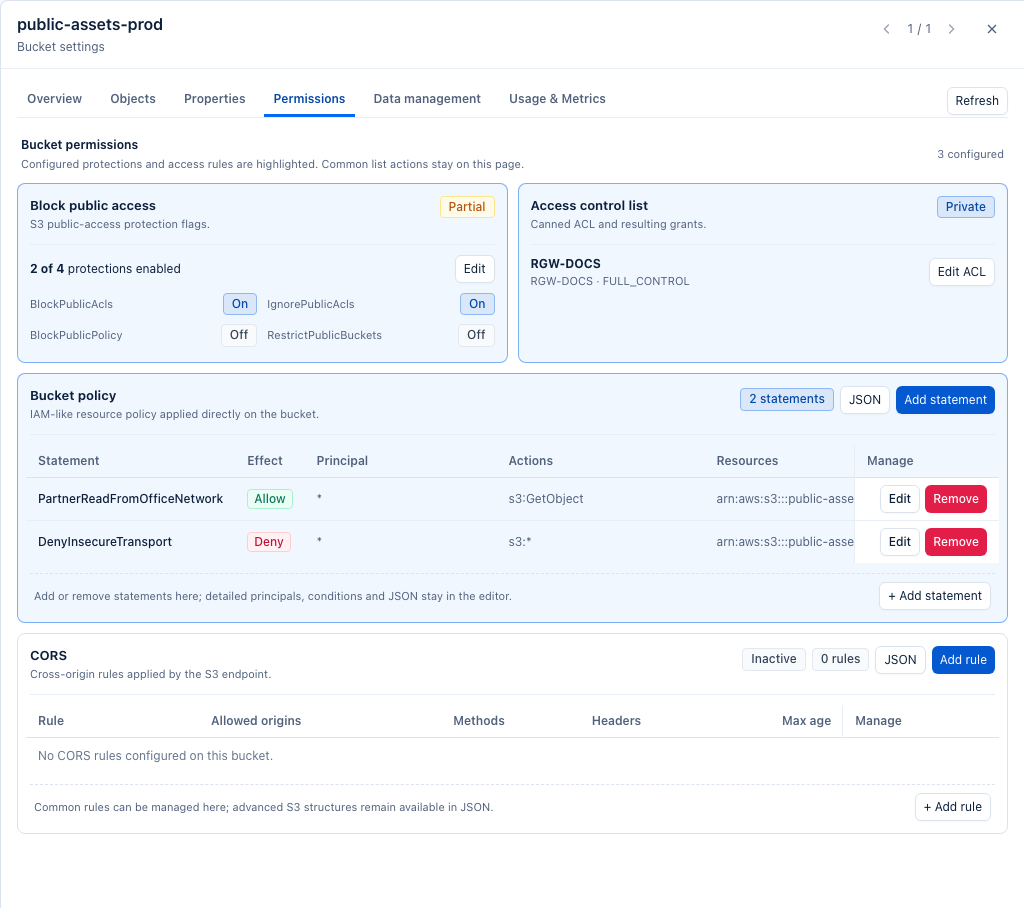
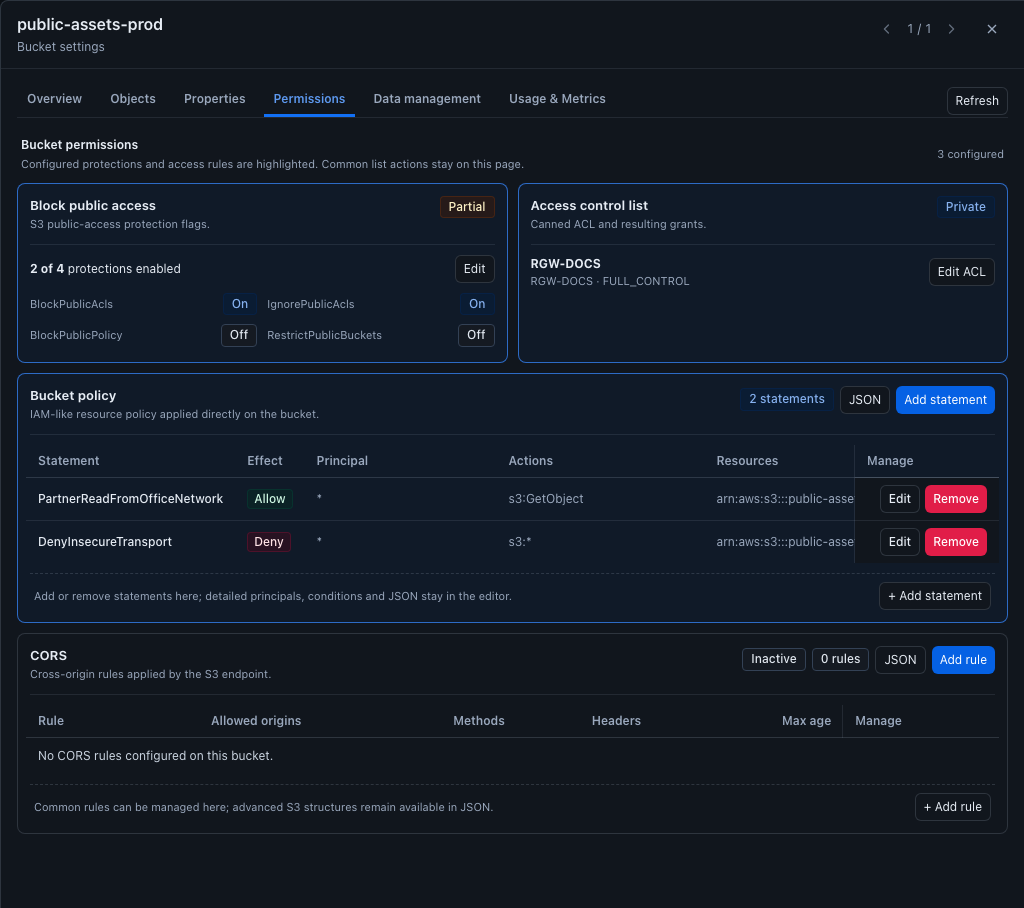
The permissions view is useful because it puts the controls side by side. In
the example below the Block Public Access configuration is only partial, the
ACL is private, and the bucket policy contains both an allow statement with a
Principal of * and a transport deny. The effective exposure therefore
cannot be inferred from a single flag.
3. Mark the audit result
Use Actions… > Selection > Manage UI tags… to maintain working sets such as:
public-access-approved;public-access-remediate;public-access-owner-review.
UI tags do not change S3 access. They provide an auditable BucketReef-side classification for the campaign.
4. Remediate confirmed private buckets
For buckets confirmed to require private access:
- Select only the remediation set.
- Open Actions… > S3 API > Configure selected buckets….
- Use Add block public access with the controls required by your policy.
- If a bucket policy itself grants unwanted public access, review and update that policy as part of the same change plan. BucketReef also exposes bulk policy-statement actions when a uniform policy statement can be safely identified.
- Preview available bulk changes before applying them.
Do not use Remove block public access as a shortcut for enabling a public site unless the bucket policy and access model have been reviewed separately.
5. Verify the final state
- Refresh the bucket inventory.
- Re-run the same Advanced filter criteria.
- Confirm that remediated buckets now have the expected Block Public Access configuration.
- Open representative buckets and verify the final policy/ACL/BPA combination.
- Keep the audit tags when they are useful for periodic reviews.
Limits / feature flags
Note
BucketReef can surface configuration that contributes to public exposure, but this workflow is an operator audit rather than a single computed “public/private” verdict.