How-to: Roll Out S3 Event Notifications Across Multiple Buckets
Use this workflow when the same application event stream must be enabled on a set of buckets without configuring each bucket manually.
The example targets project-prod-* buckets that should publish object-create
events for the incoming/ prefix.
Scenario
Assume the notification destination is already configured and reachable from the selected Ceph RGW endpoint. The desired bucket notification is represented by a named configuration so that future updates can replace the same entry instead of appending duplicates.
Example configuration:
{
  "TopicConfigurations": [
    {
      "Id": "project-ingest-events",
      "TopicArn": "arn:aws:sns:default::project-ingest",
      "Events": ["s3:ObjectCreated:*"],
      "Filter": {
        "Key": {
          "FilterRules": [
            {
              "Name": "prefix",
              "Value": "incoming/"
            }
          ]
        }
      }
    }
  ]
}
Use the topic ARN and JSON shape required by your RGW notification setup. The values above are examples.
Prerequisites
- Access to Ceph Admin > Buckets.
- The selected endpoint exposes SNS notification support.
- The notification topic and downstream destination have already been tested.
1. Find buckets missing the notification
- Open Ceph Admin > Buckets.
- Filter the bucket family, for example
project-prod-. - Open Advanced filter.
- Use notification detail criteria such as rule ID, topic name/ARN, event, prefix, suffix, or EventBridge presence to find buckets that are missing or differ from the intended configuration.
2. Mark the rollout set
Select the reviewed buckets and add a shared UI tag such as
notification-rollout from
Actions… > Selection > Manage UI tags….
3. Back up notification configuration
Use Actions… > S3 API > Back up bucket configurations… and include bucket notification configuration before the mutation.
4. Preview the notification change
- Open Actions… > S3 API > Configure selected buckets….
- Choose Add or update notification configurations.
- Paste the approved Notification configuration (JSON).
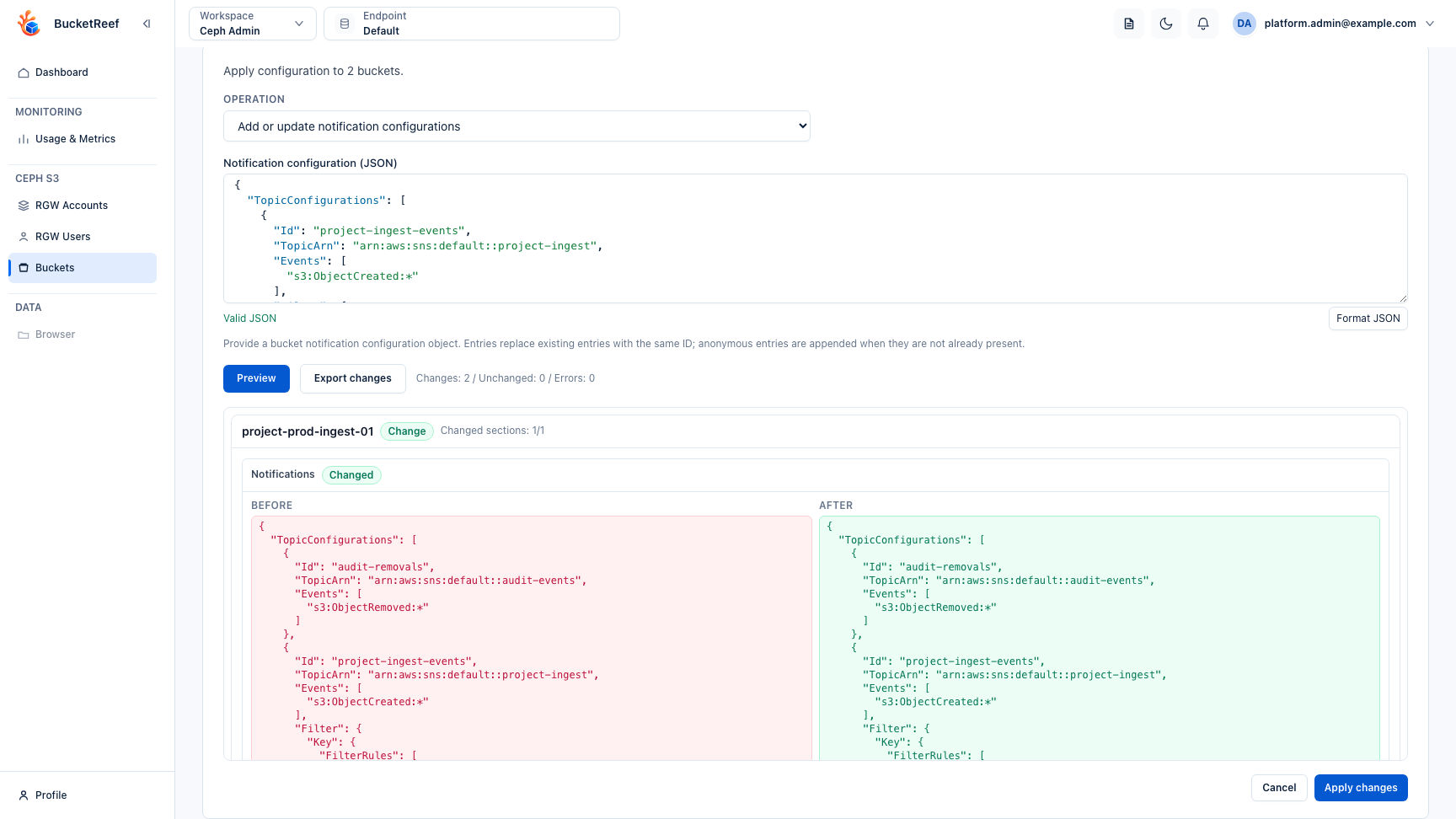
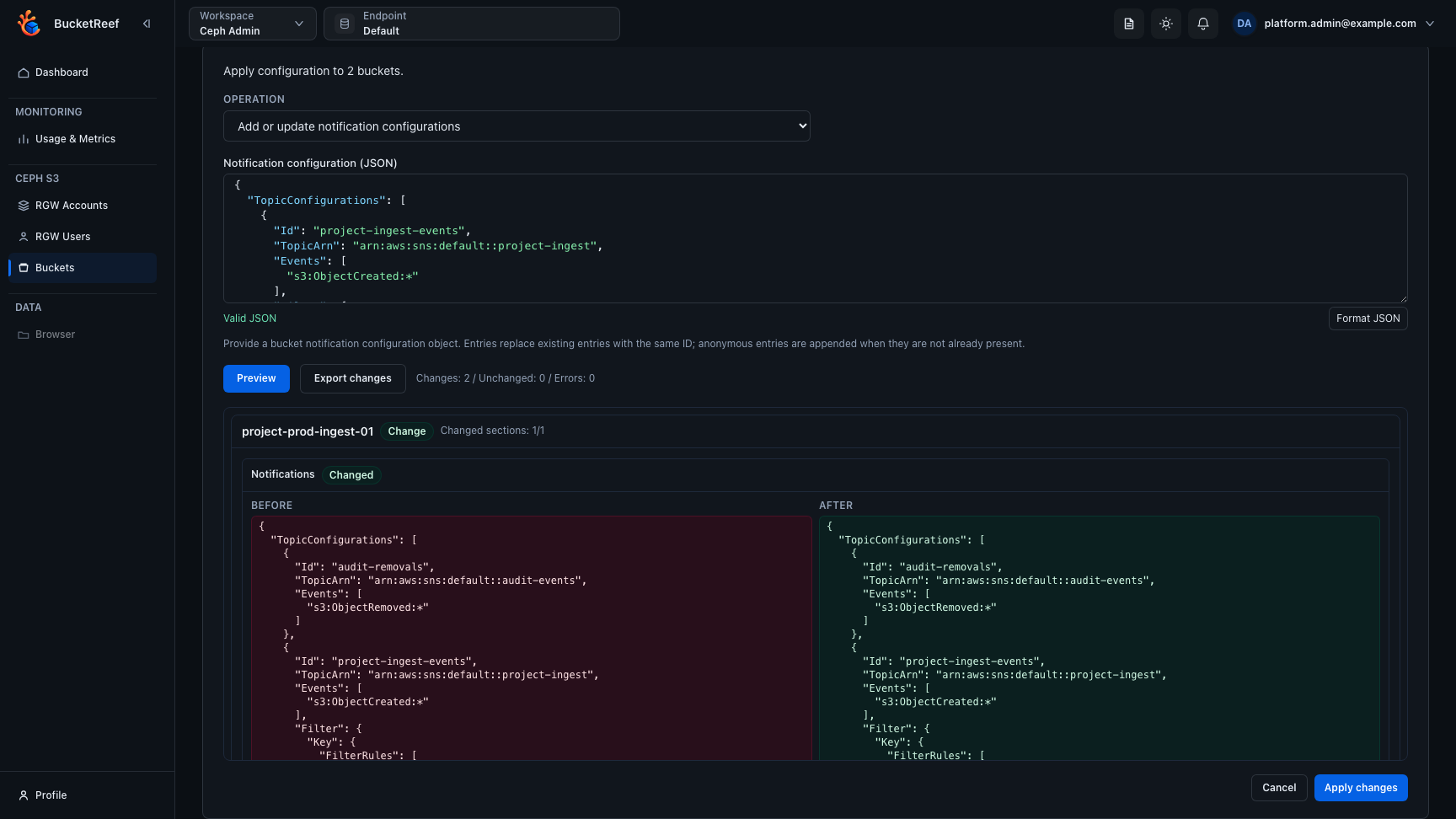
- Click Preview.
- Review representative buckets and confirm that unrelated notification entries remain intact.
Named entries with the same ID are replaced. Entries with other IDs remain in place. Anonymous entries are appended only when an identical anonymous entry is not already present, so stable IDs are preferable for managed rollouts.
The preview below demonstrates that boundary: audit-removals is preserved in
both Before and After, while the named project-ingest-events entry is
the one being updated for the rollout.
5. Apply and verify
- Apply the change after the preview is clean.
- Refresh the bucket inventory.
- Re-run Advanced filter for
project-ingest-events, the expected topic, ands3:ObjectCreated:*. - Confirm the
incoming/prefix on representative buckets. - Upload a test object to a non-production or approved test bucket and verify that the downstream consumer receives the expected event.
If you do not see this action
Add or update notification configurations is available only when the selected endpoint exposes SNS support. Check the endpoint capability and Ceph RGW notification configuration before troubleshooting the bulk workflow.